Showing my Dreeve stats on a TRMNL
How I put my workout totals from Dreeve on a TRMNL e-ink display, with a private plugin, a small script and GitHub Actions.
For years, Strava was where I went to see my workout stats, but these days it’s become stingy with what it offers for free. With Claude around, keeping a self-hosted server running is easy, so moving to an open source app was a no-brainer. The one I picked is Dreeve: it shows my stats on my own server, and it has an HTTP API.
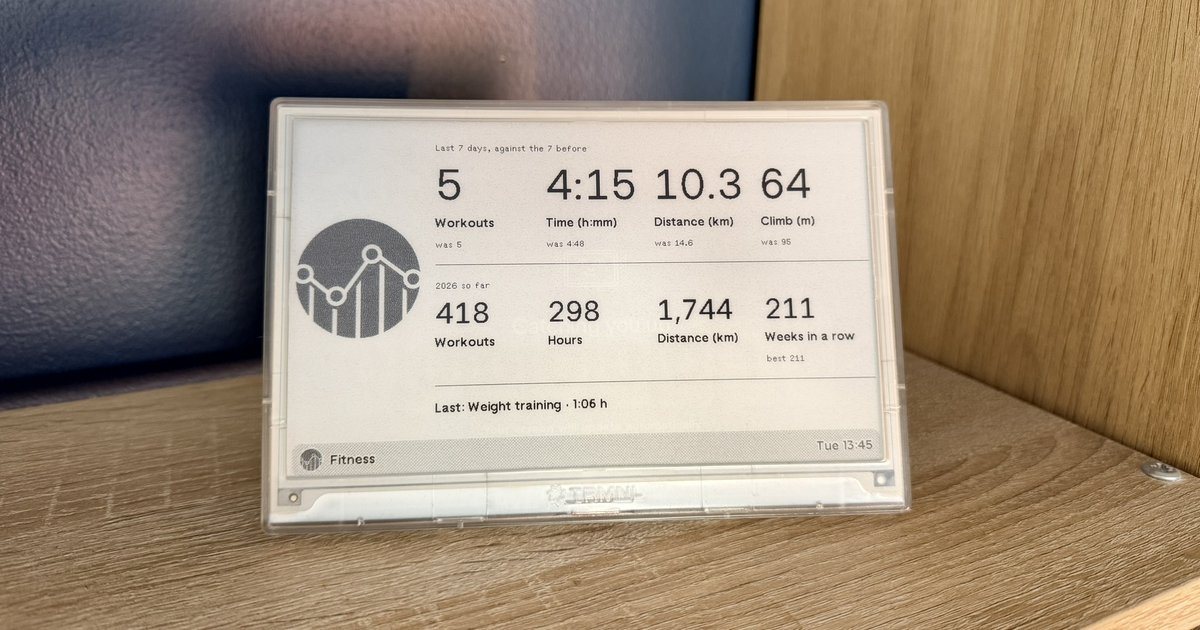
That API means I can put my stats on my TRMNL, an e-ink display that shows a rotating playlist of “plugins”: the weather, your calendar, or pretty much anything you can get some numbers out of. Put the two together, and you get this:
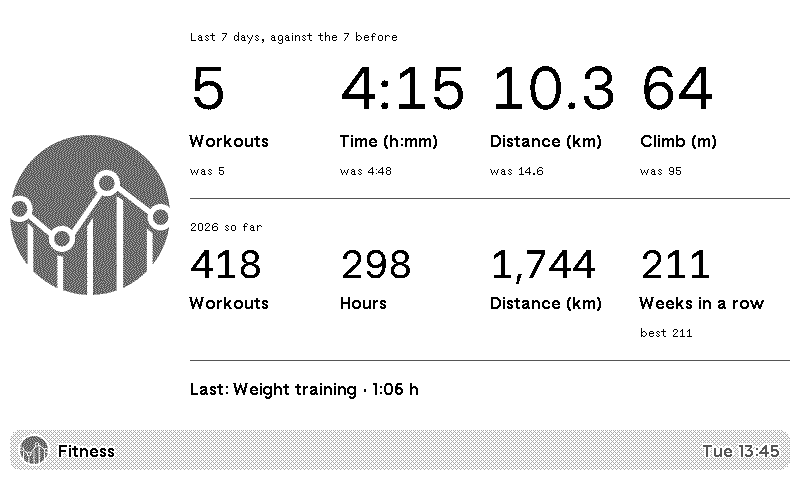 The screen as TRMNL renders it
That’s how much I trained in the last 7 days against the 7 before, my year so far, how many weeks in a row I’ve worked out, and my latest activity. Dreeve’s maintainer asked whether I’d write up how it works, so here it is. As usual, Claude did a lot of the heavy lifting. So let’s get stuck in.
How it works
A small script, run once a day:
- asks Dreeve’s API for your totals and streak (
GET /api/v1/metrics/training-volumeand/metrics/streaks) and your latest activity, - posts them to the plugin’s webhook on TRMNL.
TRMNL fills the numbers into the plugin’s markup, renders it, and shows it on the device. Only the totals leave your server: no routes, no activity names, no dates. That matters, because TRMNL’s servers do the rendering, and your Dreeve dashboard’s heatmap shows exactly where you live.
The numbers are Dreeve’s own, so they match what your dashboard shows.
What you need
- Dreeve 5.6.2 or newer (that’s when the metrics endpoints arrived), with an API key: Settings → Security → API access. Dreeve only has the one key, so if something else already uses it, reuse it rather than generating a new one.
- A TRMNL with the Developer edition add-on, which unlocks private plugins.
- A GitHub account, to run the script once a day. Nothing to install on your Dreeve server, but Dreeve does need to be reachable from the internet.
1. Create the plugin
In TRMNL, go to Plugins → Private Plugin → New, give it a name, and set the strategy to Webhook. Save it and copy the webhook URL. Then open Edit Markup and paste this into the Full view:
1
2
3
4
5
6
7
8
9
10
11
12
13
14
15
16
17
18
19
20
21
22
23
24
25
26
27
28
29
30
31
32
33
34
35
36
37
38
39
40
41
42
43
44
45
46
47
48
49
50
51
52
53
54
55
56
57
58
59
60
61
62
63
64
65
<div class="layout layout--row gap--large">
  <img class="image-dither" src="https://raw.githubusercontent.com/dreeveapp/dreeve/master/public/assets/images/logo.svg" style="width: 160px; height: 160px; object-fit: contain" />

  <div class="flex flex--col gap--large" style="flex: 1; align-items: stretch">
    <div class="flex flex--col w--full" style="align-items: stretch; gap: 8px">
      <span class="description">Last 7 days, against the 7 before</span>
      <div style="display: grid; grid-template-columns: repeat(4, 1fr)">
        <div class="flex flex--col" style="align-items: flex-start">
          <span class="value value--large value--tnums">{{ week_count }}</span>
          <span class="label">Workouts</span>
          <span class="description">was {{ week_count_prev }}</span>
        </div>
        <div class="flex flex--col" style="align-items: flex-start">
          <span class="value value--large value--tnums">{{ week_time }}</span>
          <span class="label">Time (h:mm)</span>
          <span class="description">was {{ week_time_prev }}</span>
        </div>
        <div class="flex flex--col" style="align-items: flex-start">
          <span class="value value--large value--tnums">{{ week_km }}</span>
          <span class="label">Distance (km)</span>
          <span class="description">was {{ week_km_prev }}</span>
        </div>
        <div class="flex flex--col" style="align-items: flex-start">
          <span class="value value--large value--tnums">{{ week_climb | number_with_delimiter }}</span>
          <span class="label">Climb (m)</span>
          <span class="description">was {{ week_climb_prev | number_with_delimiter }}</span>
        </div>
      </div>
    </div>

    <div class="border--h-3 w--full"></div>

    <div class="flex flex--col w--full" style="align-items: stretch; gap: 8px">
      <span class="description">{{ year }} so far</span>
      <div style="display: grid; grid-template-columns: repeat(4, 1fr)">
        <div class="flex flex--col" style="align-items: flex-start">
          <span class="value value--tnums">{{ year_count }}</span>
          <span class="label">Workouts</span>
        </div>
        <div class="flex flex--col" style="align-items: flex-start">
          <span class="value value--tnums">{{ year_time }}</span>
          <span class="label">Hours</span>
        </div>
        <div class="flex flex--col" style="align-items: flex-start">
          <span class="value value--tnums">{{ year_km | number_with_delimiter }}</span>
          <span class="label">Distance (km)</span>
        </div>
        <div class="flex flex--col" style="align-items: flex-start">
          <span class="value value--tnums">{{ week_streak }}</span>
          <span class="label">Weeks in a row</span>
          <span class="description">best {{ week_streak_best }}</span>
        </div>
      </div>
    </div>

    <div class="border--h-3 w--full"></div>
    <span class="label">Last: {{ last_activity }}</span>
  </div>
</div>

<div class="title_bar">
  <img class="image" src="https://raw.githubusercontent.com/dreeveapp/dreeve/master/public/assets/images/logo.svg" />
  <span class="title">Fitness</span>
  <span class="instance">{{ updated }}</span>
</div>
The classes come from TRMNL’s framework. The half and quadrant views need their own, smaller layouts: the last 7 days’ four numbers on their own work well there.
2. Make a repository for the script
On GitHub, create a new private repository. Then, under Settings → Secrets and variables → Actions, add three repository secrets:
DREEVE_URL: your Dreeve’s address, such ashttps://dreeve.example.comDREEVE_API_KEY: the key from DreeveTRMNL_WEBHOOK_URL: the webhook URL from step 1
Both the key and the webhook URL really are secrets. Anyone with the key can edit and delete your activities, and anyone with the webhook URL can change what your display shows, so keep them in secrets and never in the code.
3. Add the script
Save this as dreeve-trmnl.mjs in the repository. It has no dependencies.
1
2
3
4
5
6
7
8
9
10
11
12
13
14
15
16
17
18
19
20
21
22
23
24
25
26
27
28
29
30
31
32
33
34
35
36
37
38
39
40
41
42
43
44
45
46
47
48
49
50
51
52
53
54
55
56
57
58
59
60
61
62
63
// Sends workout totals from Dreeve to a TRMNL private plugin. Only totals leave.
//   DREEVE_URL=https://dreeve.example.com DREEVE_API_KEY=… TRMNL_WEBHOOK_URL=… node dreeve-trmnl.mjs
// Add DRY_RUN=true to print the totals without sending them.
const TZ = process.env.TZ || 'Europe/London';

const get = async (path) => {
  const res = await fetch(`${process.env.DREEVE_URL}/api/v1${path}`, {
    headers: { Authorization: `Bearer ${process.env.DREEVE_API_KEY}` },
  });
  if (!res.ok) throw new Error(`${path}: ${res.status} ${await res.text()}`);
  return res.json();
};

const today = new Intl.DateTimeFormat('en-CA', { timeZone: TZ }).format(new Date());
const daysBefore = (day, n) => {
  const d = new Date(`${day}T12:00:00Z`);
  d.setUTCDate(d.getUTCDate() - n);
  return d.toISOString().slice(0, 10);
};
const hoursMinutes = (s) => `${Math.floor(Math.round(s / 60) / 60)}:${String(Math.round(s / 60) % 60).padStart(2, '0')}`;
const volume = (from, to) => get(`/metrics/training-volume?filters[from]=${from}&filters[to]=${to}`);

// The last 7 completed days (ending yesterday), the 7 before, the year so far, the week streak
// (Monday to Sunday) and the newest activity.
const [week, prev, year, streaks, { activities: [last] }] = await Promise.all([
  volume(daysBefore(today, 7), daysBefore(today, 1)),
  volume(daysBefore(today, 14), daysBefore(today, 8)),
  volume(`${today.slice(0, 4)}-01-01`, today),
  get('/metrics/streaks'),
  get('/activities?pagination[size]=1'),
]);

// "Run · 8.2 km · 46 min" or "Weight training · 1:06 h", without the distance for activities
// that have none.
const sport = last?.sportType.replace(/(?<=[a-z])(?=[A-Z])/g, ' ').toLowerCase();
const lastActivity = last && [
  sport[0].toUpperCase() + sport.slice(1),
  last.distanceInMeter > 0 && `${(last.distanceInMeter / 1000).toFixed(1)} km`,
  last.movingTimeInSeconds >= 3600 ? `${hoursMinutes(last.movingTimeInSeconds)} h` : `${Math.round(last.movingTimeInSeconds / 60)} min`,
].filter(Boolean).join(' · ');

const km = (m) => Number((m / 1000).toFixed(1));
const merge_variables = {
  week_count: week.numberOfActivities, week_count_prev: prev.numberOfActivities,
  week_time: hoursMinutes(week.movingTimeInSeconds), week_time_prev: hoursMinutes(prev.movingTimeInSeconds),
  week_km: km(week.distanceInMeter), week_km_prev: km(prev.distanceInMeter),
  week_climb: week.elevationInMeter, week_climb_prev: prev.elevationInMeter,
  year: today.slice(0, 4), year_count: year.numberOfActivities,
  year_time: Math.round(year.movingTimeInSeconds / 3600), year_km: Math.round(year.distanceInMeter / 1000),
  week_streak: streaks.week.current, week_streak_best: streaks.week.longest,
  last_activity: lastActivity,
  updated: new Intl.DateTimeFormat('en-GB', { timeZone: TZ, weekday: 'short', hour: '2-digit', minute: '2-digit' }).format(new Date()),
};
console.log(merge_variables);

if (process.env.DRY_RUN !== 'true') {
  const res = await fetch(process.env.TRMNL_WEBHOOK_URL, {
    method: 'POST',
    headers: { 'Content-Type': 'application/json' },
    body: JSON.stringify({ merge_variables }),
  });
  if (!res.ok) throw new Error(`TRMNL: ${res.status} ${await res.text()}`);
}
What each part does:
get: Asks Dreeve’s API for something, with your key, and stops with an error if Dreeve says no.todayanddaysBefore: Work out the dates in your time zone, not the server’s, so “yesterday” means your yesterday.- The
Promise.all: Asks for all five things at once: the last 7 days (ending yesterday, so a half-finished today doesn’t drag the numbers down), the 7 before, the year so far, the streaks and the newest activity. lastActivity: Turns the newest activity into something like “Run · 8.2 km · 46 min”, or “Weight training · 1:06 h” for anything over an hour. Strength sessions have no distance, so they get just the time.merge_variables: The numbers the markup shows, under the names it uses. That’s everything that goes to TRMNL.DRY_RUN: Prints the numbers and sends nothing. Handy for checking it on your own machine first, if you have Node.js 18 or newer.
4. Run it once a day
Add this workflow as .github/workflows/dreeve-trmnl.yml:
1
2
3
4
5
6
7
8
9
10
11
12
13
14
15
16
name: Dreeve on TRMNL
on:
  schedule:
    - cron: "0 6 * * *"
  workflow_dispatch:
jobs:
  update:
    runs-on: ubuntu-latest
    steps:
      - uses: actions/checkout@v5
      - run: node dreeve-trmnl.mjs
        env:
          DREEVE_URL: ${{ secrets.DREEVE_URL }}
          DREEVE_API_KEY: ${{ secrets.DREEVE_API_KEY }}
          TRMNL_WEBHOOK_URL: ${{ secrets.TRMNL_WEBHOOK_URL }}
          TZ: Europe/London
schedule: Runs it at 06:00 every day. The numbers are whole days, so once a day is plenty, and well inside TRMNL’s webhook limit of 12 updates an hour. GitHub’s clock is UTC, and scheduled runs can start a little late when GitHub’s busy.workflow_dispatch: Adds a Run workflow button to the repository’s Actions tab, so you don’t have to wait until tomorrow to see it work.TZ: Your time zone, for the dates and the time in the title bar.
Commit it, press Run workflow, and the run’s log shows the numbers it sent. Your TRMNL shows them at its next refresh.
Making it your own
- One sport, or several.
training-volumeandstreakstakefilters[sportType](Run, orRun,TrailRun), so a screen can be about running alone.training-volumealso returns the calories burned. - Other metrics.
GET /api/v1/metrics/training-loadgives your fitness, fatigue and form (with a status such asSLIGHTLY_FRESH, which reads nicely on e-ink), and/metrics/eddingtonyour Eddington numbers. - The streak. It’s Dreeve’s week streak, which holds while your latest activity is less than 7 days old.
streakshas day and month streaks too. - Strength training. Strength sessions carry time and heart rate but no distance, so they count towards workouts and time only.
- Previewing. TRMNL’s trmnlp renders a plugin on your own machine with sample data, which is much quicker for trying out a layout than editing in the browser. It’s how I tried out this layout before it went anywhere near the device.
Troubleshooting
Click a problem to see what to check and how to fix it.
The workflow fails with a 401 from Dreeve
Check: The DREEVE_API_KEY secret.
Fix: Copy the key from Dreeve again. If you generated a new one, anything else using the old key stops working too.
The workflow fails with a 404 on /metrics/...
Check: Your Dreeve’s version.
Fix: The metrics endpoints arrived in 5.6.2, so update Dreeve.
The workflow can't connect to Dreeve at all
Check: Does DREEVE_URL open from your phone, off your home Wi-Fi?
Fix: GitHub’s runners are out on the internet, so they can only reach a Dreeve that is too. If yours is only on your home network, run the script there instead (a cron job on the Dreeve host works fine).
The run succeeds, but the screen hasn't changed
Check: The plugin is in your device’s playlist, and the run’s log shows the numbers you expect.
Fix: Wait for the device’s next refresh. It shows the new numbers the next time the plugin comes round in the playlist.