A Stream Deck for my desk, run by Home Assistant
Inspired by EspDesktop, I turned a cheap 4-inch touchscreen into a grid of buttons for my office, with Home Assistant doing the thinking.
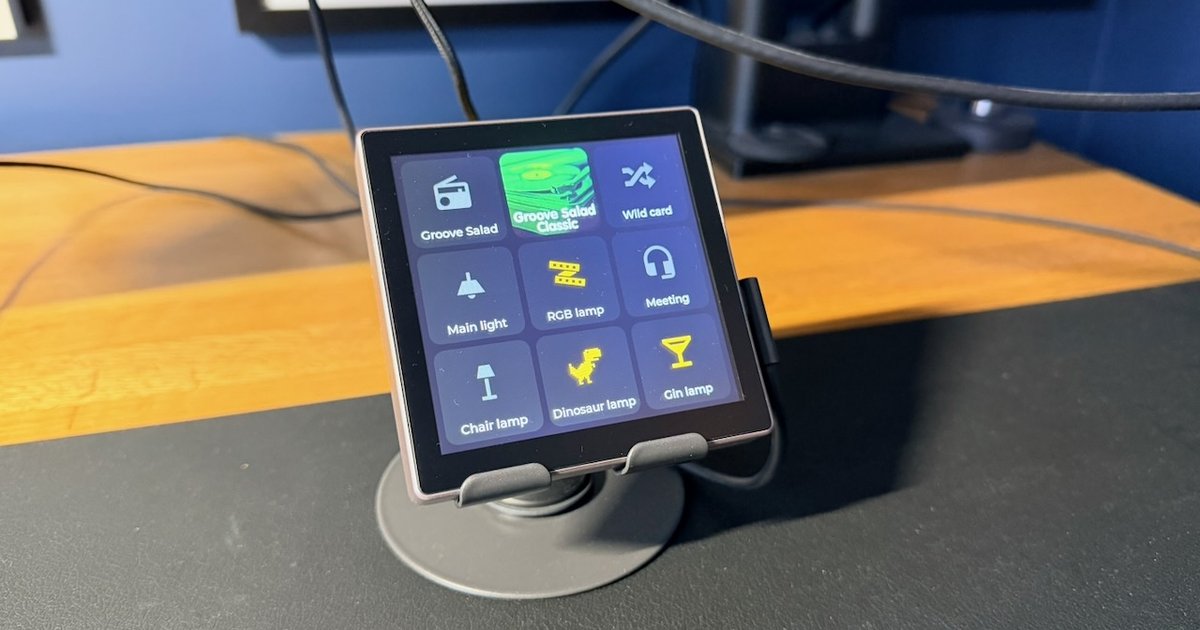
I recently came across EspDesktop on Reddit, and was instantly inspired by it. The idea is simple: a cheap 4-inch touchscreen sits on your desk, covered in buttons which open apps, websites and shortcuts on your Mac. Basically, a homemade Stream Deck.
I don’t really need another way of opening apps, though. What I do have is an office full of lamps, a Sonos speaker, and Home Assistant running all of it - so it didn’t take long to work out what I wanted mine to do.
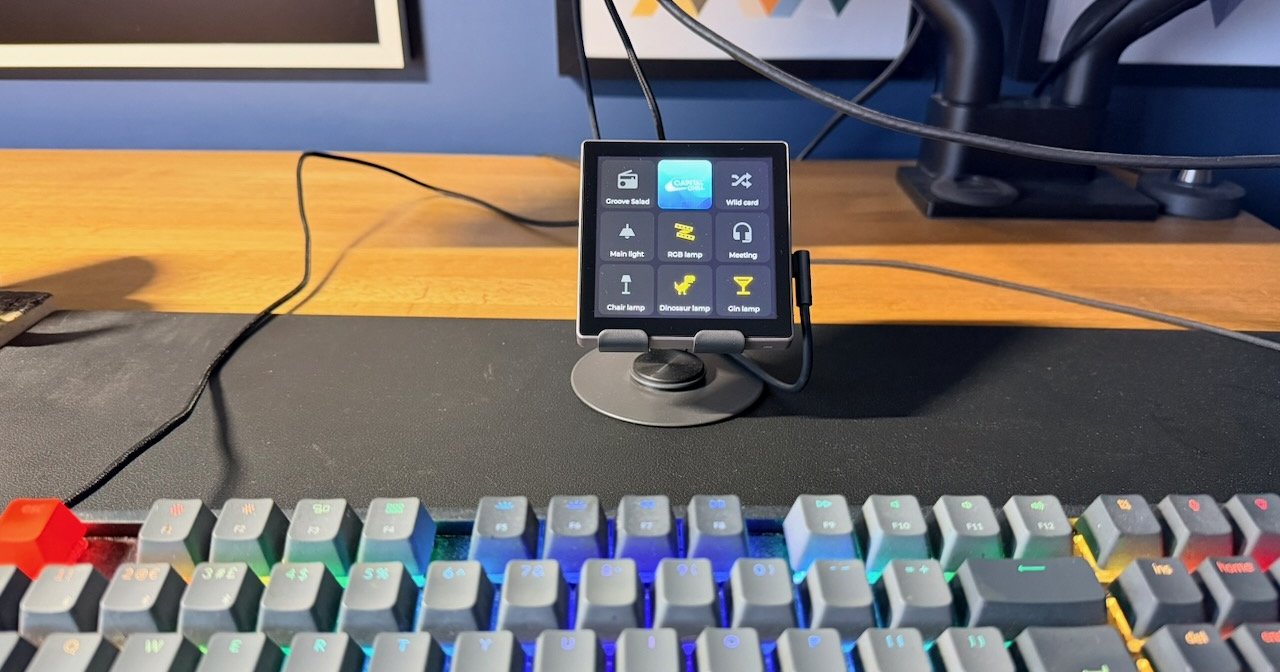 The deck, sat just behind my keyboard
The screen EspDesktop uses is a Guition ESP32-S3-4848S040, which is quite the mouthful, so from here on out I’m just going to call it the deck.
It’s a 480x480 touchscreen with an ESP32-S3 on the back, and it was originally designed to sit in a wall box and replace a light switch. You can buy it with a relay module which lets it do exactly that, but as mine was going on my desk rather than in my wall, I went for the version without.
This was the first thing I’d ever ordered from AliExpress, and I’ll admit I was a little anxious about whether I’d ever actually see it. I needn’t have worried. They told me about every step of its journey (and I mean every step - I don’t think I’ve ever had so many shipping updates for one parcel), and it was in my hand less than a week later.
The manual comes with a stern warning not to power it with a USB-C to USB-C cable, and to use USB-A to USB-C instead. It turns out the board is missing the resistors a USB-C charger looks for before it’ll hand over any power, so a C-to-C cable might give it nothing at all. I plugged it into my Mac, and thankfully it sprang to life.
Out of the box it runs a demo which asks for your Wi-Fi details, then works out where you are. It was a little slow, but it proved the screen and touch worked, which was all I really needed before wiping it.
In the past, this is the sort of idea I’d have been really inspired by, then never got around to, because the learning curve was just too steep. Display drivers, graphics libraries, a whole new firmware - I wouldn’t have known where to start. Having Claude on hand to explain what’s going on (and to work out why things weren’t working) flattened that curve enough that I actually got it built.
The firmware is ESPHome, which builds everything from a YAML config file, and gets picked up by Home Assistant automatically. There’s a Home Assistant add-on for it, but my Home Assistant Green would take an age to compile anything, and the first flash needed a USB cable anyway, so we ran it on my Mac instead. After that first flash, updates go over Wi-Fi.
Thankfully, someone else had already done the hard part. The Guition page on the ESPHome devices site has a config with all the display, touch and backlight pins worked out, which I can only imagine saved me days of frustration.
We started simple, with buttons for the lights in my office.
Each button doesn’t actually do anything itself - it just asks Home Assistant to toggle something. (If you’re trying this yourself, there’s a setting in the ESPHome integration called “Allow the device to perform Home Assistant actions”, and nothing works until you turn it on.)
The first version worked, but it was just grey boxes with words on, and didn’t look great. So the second version copied the dark mode of the Office panel (the Android tablet I bought to run a Home Assistant dashboard), right down to the same icons. I struggle to tell dark gold from red, so a lamp that’s on gets Home Assistant’s bright yellow, and one that’s off gets a dim grey.
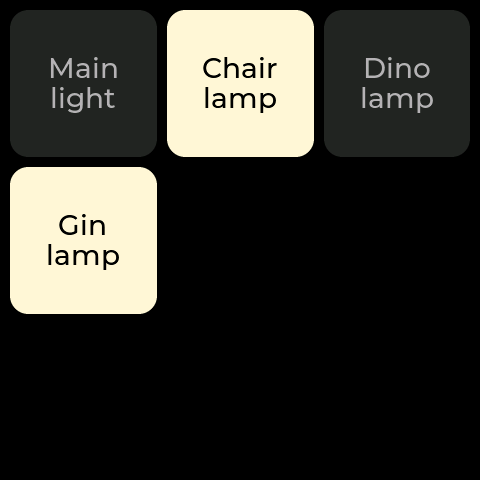 The first version, with just the lamps (recreated in ESPHome’s emulator, from the config as it was at the time)
Once that was done I added meeting mode, my RGB lamp, and my three radio station buttons, which filled up the 3x3 grid nicely:
- Along the top: my radio stations.
- In the middle: the main light, the RGB lamp and meeting mode.
- Along the bottom: the chair lamp, the dinosaur lamp and the gin lamp.
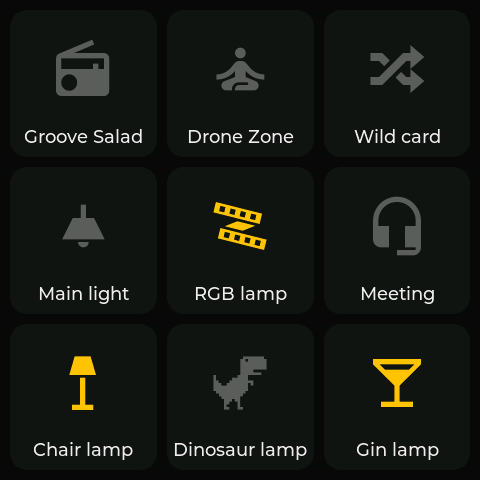 The second version, with the panel’s icons and the full grid
At this point I got curious. If I turned a lamp on from my phone, would the deck know about it?
It does, because the deck never decides for itself whether something’s on. A button only lights up when Home Assistant tells it the thing is on, so it doesn’t matter whether that thing got turned on from the deck, the panel, my phone or an automation.
At least, that was the theory. My gin lamp was very much on, and its button was very much off.
It turns out ESPHome ignores the very first state it receives after it boots, so any lamp already on when the deck started stayed dark until it next changed. One line in the config for each button (trigger_on_initial_state: true) sorted it, and the gin lamp lit up.
Later on I moved it to a different USB plug, and when it came back up the buttons appeared pretty quickly, but took about 30 seconds to catch up with what was actually on. I can live with that.
A bright screen on my desk late at night isn’t ideal, so the deck now follows the same routine as Oni, my Floor796 kiosk: full brightness during the day, dimmed after sunset, and off overnight or when I’m out.
Oni dims to 20%, which on the deck was far too dark to read, so it gets 50% instead.
If I tap it while it’s off it wakes up for a minute, but that tap doesn’t press anything. Otherwise I’d be turning lamps on and off in the dark without knowing which.
By now I was having a lot of fun, so I asked what else it could do, and settled on a second page for music controls: what’s playing, previous, play/pause, next, and a volume slider.
My first go switched between pages with a swipe, like a phone. This didn’t last long.
Every time I swiped, the volume would jump. Then meeting mode started turning itself on. My finger was landing on the slider or a button at the start of each swipe, and they were reacting before the page moved. I spent a while convinced the volume slider was broken, when actually meeting mode (switched on by one of my swipes) was holding the volume down, exactly as it’s designed to.
And even when it did work, the deck isn’t fixed to anything, so swiping just shoved it across my desk.
So swiping is out, and buttons are in. The middle button on the top row opens the music page, and a back arrow (or a minute of being left alone) takes you back.
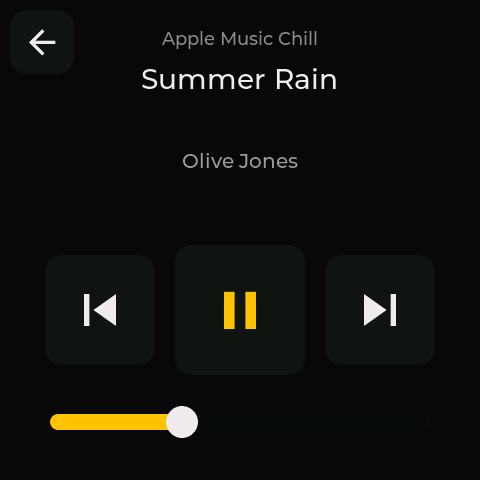 The music page
That button used to be my Drone Zone station, but I only ever use that for meditation, which I start from my watch anyway, so it wasn’t missed. Instead, it shows the album art for whatever’s playing, which turns it into a little now-playing display. It even has the same rounded corners as the buttons, which I’m rather pleased with.
Normal tracks worked a treat, but my radio stations didn’t. Some of them are added to Sonos by their stream address, and for those, Sonos gives Home Assistant a link to a picture that doesn’t exist. Yet the Sonos app shows a logo for every one of them, so they had to be somewhere.
It turns out they’re stored with the Sonos favourites, which Home Assistant can look up, so now both the panel and the deck show the station’s logo. A few stations don’t have a logo at all, so they get a purple radio tower instead, the same one the panel uses.
Or at least they should have. The deck kept showing a music note, and it took a look through the logs to find out why: Home Assistant was sending “on”, where the deck was expecting “True”. One word later, and the radio tower appeared.
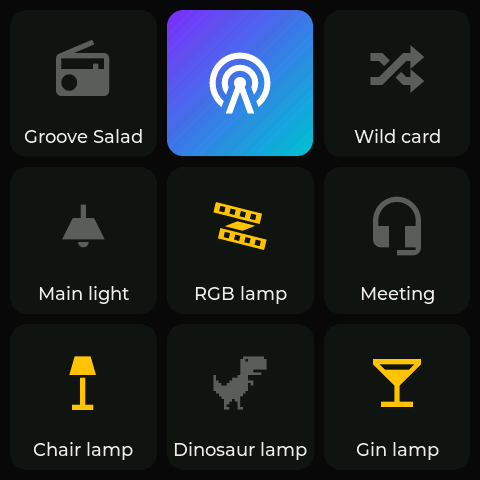 Where it is now, with the radio tower showing for a station without a logo
For now, the deck sits on my desk with a USB cable sticking out of its side, which bugs me more than it should.
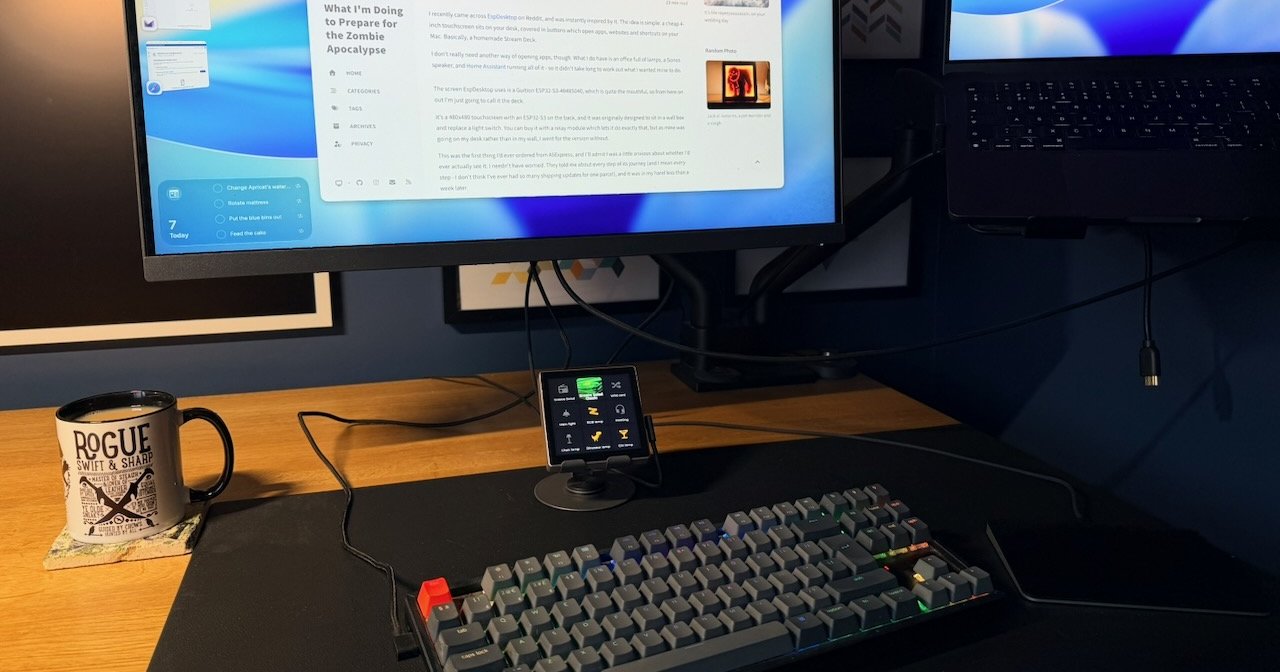 Writing this post, with the deck and its cable in the middle of it all
The good news is, the connector on the back (where the relay module would plug in) takes 5V too, so I can power it from there instead and hide the cable. Here’s the pinout, from the labelled photo on the ESPHome devices page, with the back facing you and the USB-C on the left:
| Left | Right |
|---|---|
| GND | GND |
| GPIO40 | RXD |
| GPIO2 | TXD |
| GPIO1 | 5V |
The plan is an old USB cable with the end chopped off and some Dupont connectors crimped on, but I’ll be checking the wires with a multimeter first. I’ve learnt the hard way that not all power supplies are equal, and cheap cables don’t always stick to red for 5V and black for ground.
After that, maybe a 3D-printed stand to hide it all in, and I might even build another one for a different room at some point.
As ever, watch this space.
If you want to build one yourself, here’s the deck’s full config, and the Home Assistant sensor which finds the station logos. Swap in your own lamps, icons and Home Assistant address.
office-deck.yaml (ESPHome)
1
2
3
4
5
6
7
8
9
10
11
12
13
14
15
16
17
18
19
20
21
22
23
24
25
26
27
28
29
30
31
32
33
34
35
36
37
38
39
40
41
42
43
44
45
46
47
48
49
50
51
52
53
54
55
56
57
58
59
60
61
62
63
64
65
66
67
68
69
70
71
72
73
74
75
76
77
78
79
80
81
82
83
84
85
86
87
88
89
90
91
92
93
94
95
96
97
98
99
100
101
102
103
104
105
106
107
108
109
110
111
112
113
114
115
116
117
118
119
120
121
122
123
124
125
126
127
128
129
130
131
132
133
134
135
136
137
138
139
140
141
142
143
144
145
146
147
148
149
150
151
152
153
154
155
156
157
158
159
160
161
162
163
164
165
166
167
168
169
170
171
172
173
174
175
176
177
178
179
180
181
182
183
184
185
186
187
188
189
190
191
192
193
194
195
196
197
198
199
200
201
202
203
204
205
206
207
208
209
210
211
212
213
214
215
216
217
218
219
220
221
222
223
224
225
226
227
228
229
230
231
232
233
234
235
236
237
238
239
240
241
242
243
244
245
246
247
248
249
250
251
252
253
254
255
256
257
258
259
260
261
262
263
264
265
266
267
268
269
270
271
272
273
274
275
276
277
278
279
280
281
282
283
284
285
286
287
288
289
290
291
292
293
294
295
296
297
298
299
300
301
302
303
304
305
306
307
308
309
310
311
312
313
314
315
316
317
318
319
320
321
322
323
324
325
326
327
328
329
330
331
332
333
334
335
336
337
338
339
340
341
342
343
344
345
346
347
348
349
350
351
352
353
354
355
356
357
358
359
360
361
362
363
364
365
366
367
368
369
370
371
372
373
374
375
376
377
378
379
380
381
382
383
384
385
386
387
388
389
390
391
392
393
394
395
396
397
398
399
400
401
402
403
404
405
406
407
408
409
410
411
412
413
414
415
416
417
418
419
420
421
422
423
424
425
426
427
428
429
430
431
432
433
434
435
436
437
438
439
440
441
442
443
444
445
446
447
448
449
450
451
452
453
454
455
456
457
458
459
460
461
462
463
464
465
466
467
468
469
470
471
472
473
474
475
476
477
478
479
480
481
482
483
484
485
486
487
488
489
490
491
492
493
494
495
496
497
498
499
500
501
502
503
504
505
506
507
508
509
510
511
512
513
514
515
516
517
518
519
520
521
522
523
524
525
526
527
528
529
530
531
532
533
534
535
536
537
538
539
540
541
542
543
544
545
546
547
548
549
550
551
552
553
# Office Deck: Guition ESP32-S3-4848S040 (480x480, no relay module) as a 3x3 button grid.
esphome:
  name: office-deck
  friendly_name: Office Deck

esp32:
  variant: esp32s3
  flash_size: 16MB
  framework:
    type: esp-idf

psram:
  mode: octal
  speed: 80MHz

logger:

api:
  encryption:
    key: !secret encryption_key

ota:
  - platform: esphome
    password: !secret ota_password
    on_begin: # stop the screen flickering during OTA
      - light.turn_off:
          id: display_backlight
          transition_length: 0s
      - lambda: "id(display_backlight).loop();"

wifi:
  ssid: !secret wifi_ssid
  password: !secret wifi_password

output:
  - platform: ledc
    id: backlight_output
    pin: GPIO38
    frequency: 150Hz
    min_power: 0.01
    zero_means_zero: true

light:
  - platform: monochromatic
    name: Backlight
    id: display_backlight
    output: backlight_output
    restore_mode: ALWAYS_ON
    default_transition_length: 1s
    # HA's Oni schedule turns the backlight off overnight. While it's off LVGL is paused,
    # so a tap on the dark screen only wakes it and can't press a tile it can't see.
    on_turn_off:
      - lvgl.pause:
      - globals.set: { id: woken_by_touch, value: "false" }
    on_turn_on:
      - lvgl.resume:

globals:
  - id: woken_by_touch # lit by a tap while HA had it off: goes dark again when idle
    type: bool
    initial_value: "false"

spi:
  - id: lcd_spi
    clk_pin: GPIO48
    mosi_pin: GPIO47

i2c:
  id: touchscreen_bus
  sda: GPIO19
  scl:
    number: 45
    ignore_strapping_warning: true

display:
  - platform: st7701s
    id: tft_display
    dimensions:
      width: 480
      height: 480
    spi_mode: MODE3
    data_rate: 2MHz
    color_order: RGB
    invert_colors: false
    cs_pin: 39
    de_pin: 18
    hsync_pin: 16
    vsync_pin: 17
    pclk_pin: 21
    pclk_frequency: 12MHz
    pclk_inverted: false
    hsync_pulse_width: 8
    hsync_front_porch: 10
    hsync_back_porch: 20
    vsync_pulse_width: 8
    vsync_front_porch: 10
    vsync_back_porch: 10
    update_interval: never
    auto_clear_enabled: false
    init_sequence:
      - 1
      - [0xFF, 0x77, 0x01, 0x00, 0x00, 0x10] # CMD2_BKSEL_BK0
      - [0xCD, 0x00] # disable MDT flag
    data_pins:
      red: [11, 12, 13, 14, 0]
      green: [8, 20, 3, 46, 9, 10]
      blue: [4, 5, 6, 7, 15]

touchscreen:
  - platform: gt911
    id: tft_touch
    display: tft_display
    on_release:
      - if:
          condition: lvgl.is_paused
          then:
            - light.turn_on: { id: display_backlight, brightness: 50% }
            - globals.set: { id: woken_by_touch, value: "true" }

# Tiles show HA's state, not their own: a press only asks HA to act,
# and the tile lights when HA reports it on. Station tiles have no state.
# Meeting runs the same automation as the Mac's Shortcut, which toggles it.
# trigger_on_initial_state: without it, a tile stays dark after a reboot until its entity next changes.
binary_sensor:
  - platform: homeassistant
    entity_id: switch.office_main_light
    id: main_light_state
    trigger_on_initial_state: true
    on_state:
      - lvgl.widget.update: { id: btn_main_light, state: { checked: !lambda return x; } }
  - platform: homeassistant
    entity_id: light.rgb_lamp
    id: rgb_lamp_state
    trigger_on_initial_state: true
    on_state:
      - lvgl.widget.update: { id: btn_rgb_lamp, state: { checked: !lambda return x; } }
  - platform: homeassistant
    entity_id: input_boolean.office_meeting_mode
    id: meeting_state
    trigger_on_initial_state: true
    on_state:
      - lvgl.widget.update: { id: btn_meeting, state: { checked: !lambda return x; } }
  - platform: homeassistant
    entity_id: switch.office_chair_lamp
    id: chair_lamp_state
    trigger_on_initial_state: true
    on_state:
      - lvgl.widget.update: { id: btn_chair_lamp, state: { checked: !lambda return x; } }
  - platform: homeassistant
    entity_id: switch.office_dinosaur_lamp
    id: dinosaur_lamp_state
    trigger_on_initial_state: true
    on_state:
      - lvgl.widget.update: { id: btn_dinosaur_lamp, state: { checked: !lambda return x; } }
  - platform: homeassistant
    entity_id: switch.office_gin_lamp
    id: gin_lamp_state
    trigger_on_initial_state: true
    on_state:
      - lvgl.widget.update: { id: btn_gin_lamp, state: { checked: !lambda return x; } }

# The music page: what the Office is playing, and its volume.
# HA sends "None" for an empty attribute, so that reads as blank.
text_sensor:
  - platform: homeassistant
    entity_id: media_player.office
    id: office_player_state
    on_value:
      - lvgl.label.update:
          id: play_pause_icon
          text: !lambda 'return std::string(x == "playing" ? "\U000F03E4" : "\U000F040A");'
  - platform: homeassistant
    entity_id: media_player.office
    attribute: media_title
    id: office_media_title
    on_value:
      - lvgl.label.update:
          id: music_title
          text: !lambda 'return (x.empty() || x == "None") ? std::string("Nothing playing") : x;'
  - platform: homeassistant
    entity_id: media_player.office
    attribute: media_artist
    id: office_media_artist
    on_value:
      - lvgl.label.update:
          id: music_artist
          text: !lambda 'return x == "None" ? std::string("") : x;'
  - platform: homeassistant
    entity_id: media_player.office
    attribute: media_channel
    id: office_media_channel
    on_value:
      - lvgl.label.update:
          id: music_channel
          text: !lambda 'return x == "None" ? std::string("Office") : x;'
  # The Music tile's artwork: the track's (through HA's media player proxy, a relative URL carrying
  # its own token) or a station's logo (a full URL), from sensor.office_artwork. None keeps the icon.
  - platform: homeassistant
    entity_id: sensor.office_artwork
    attribute: picture
    id: office_artwork_picture
    on_value:
      - if:
          condition:
            lambda: 'return x.empty() || x == "None";'
          then:
            - script.execute: show_artwork_fallback
          else:
            - online_image.set_url:
                id: album_art
                url: !lambda 'return x.rfind("http", 0) == 0 ? x : "http://homeassistant.local:8123" + x;'
  - platform: homeassistant
    entity_id: sensor.office_artwork
    attribute: stream
    id: office_artwork_stream
    on_value:
      - if:
          condition:
            lambda: 'auto p = id(office_artwork_picture).state; return p.empty() || p == "None";'
          then:
            - script.execute: show_artwork_fallback

# With no picture, the panel's radio tower for a stream (www/stream-artwork.svg, built in), else the icon
script:
  - id: show_artwork_fallback
    then:
      - if:
          condition:
            lambda: 'return id(office_artwork_stream).state == "on";' # HA sends a true attribute as "on"
          then:
            - lvgl.image.update: { id: music_art, src: stream_art }
            - lvgl.widget.show: music_art
            - lvgl.widget.hide: music_icon
          else:
            - lvgl.widget.hide: music_art
            - lvgl.widget.show: music_icon

image:
  - file: ../www/stream-artwork.svg
    id: stream_art
    type: RGB565
    resize: 146x146

http_request:

online_image:
  - id: album_art
    url: http://homeassistant.local:8123/local/no-artwork.svg # replaced as soon as HA sends the real one
    format: AUTO # logos are PNG as often as JPEG
    type: RGB565
    resize: 146x146 # a grid cell: (480 - 2×10 padding - 2×10 gaps) / 3
    update_interval: never
    on_download_finished:
      - lvgl.image.update: { id: music_art, src: album_art }
      - lvgl.widget.show: music_art
      - lvgl.widget.hide: music_icon
    on_error:
      - script.execute: show_artwork_fallback

sensor:
  - platform: homeassistant
    entity_id: media_player.office
    attribute: volume_level
    id: office_volume_level
    on_value:
      - lvgl.slider.update: { id: volume_slider, value: !lambda "return x * 100;" }

# Icons are the Office panel's (dashboards/views/panel-office.yaml and the entity registry).
# Add a glyph here for each new icon: its codepoint is in https://pictogrammers.com/library/mdi/
font:
  - file:
      type: web
      url: https://cdn.jsdelivr.net/npm/@mdi/font@7.4.47/fonts/materialdesignicons-webfont.ttf
    id: mdi_64
    size: 64
    bpp: 4
    glyphs:
      - "\U000F0439" # radio
      - "\U000F075A" # music
      - "\U000F049F" # shuffle-variant
      - "\U000F0769" # ceiling-light
      - "\U000F1051" # led-strip-variant
      - "\U000F02CE" # headset
      - "\U000F08DD" # floor-lamp
      - "\U000F1362" # google-downasaur
      - "\U000F0356" # glass-cocktail
      - "\U000F04AE" # skip-previous
      - "\U000F040A" # play
      - "\U000F03E4" # pause
      - "\U000F04AD" # skip-next

  - file:
      type: web
      url: https://cdn.jsdelivr.net/npm/@mdi/font@7.4.47/fonts/materialdesignicons-webfont.ttf
    id: mdi_40
    size: 40
    bpp: 4
    glyphs:
      - "\U000F004D" # arrow-left

# Styled like the panel's dark mode: near-black page, dark tiles, the icon lit in HA's
# switch yellow when on and dim grey when off; the name stays white.
lvgl:
  text_font: montserrat_18
  on_idle:
    timeout: 60s
    then:
      - lvgl.page.show: main_page
      - if:
          condition:
            lambda: return id(woken_by_touch);
          then:
            - globals.set: { id: woken_by_touch, value: "false" }
            - light.turn_off: display_backlight
  bg_color: 0x0A0A0A
  theme:
    button:
      bg_color: 0x161616
      radius: 16
      shadow_opa: TRANSP
      text_color: 0x5C5C5C
      checked:
        bg_color: 0x161616
        text_color: 0xFFC107
      pressed:
        bg_color: 0x2A2A2A
  pages:
    - id: main_page
      bg_color: 0x0A0A0A
      pad_all: 10
      layout:
        type: grid
        grid_rows: [fr(1), fr(1), fr(1)]
        grid_columns: [fr(1), fr(1), fr(1)]
        pad_row: 10
        pad_column: 10
      widgets:
        - button:
            id: btn_groove_salad
            grid_cell_row_pos: 0
            grid_cell_column_pos: 0
            grid_cell_x_align: STRETCH
            grid_cell_y_align: STRETCH
            on_click:
              - homeassistant.action:
                  action: automation.trigger
                  data: { entity_id: automation.office_button_groove_salad }
            widgets:
              - label: { align: CENTER, y: -14, text_font: mdi_64, text: "\U000F0439" }
              - label: { align: BOTTOM_MID, text_color: 0xE8E8E8, text: "Groove Salad" }
        - button:
            id: btn_music
            grid_cell_row_pos: 0
            grid_cell_column_pos: 1
            grid_cell_x_align: STRETCH
            grid_cell_y_align: STRETCH
            pad_all: 0 # the art fills the whole tile
            on_click:
              - lvgl.page.show: music_page
            widgets:
              - label: { id: music_icon, align: CENTER, text_font: mdi_64, text: "\U000F075A" }
              - image: { id: music_art, align: CENTER, src: album_art, radius: 16, clip_corner: true, hidden: true }
        - button:
            id: btn_wild_card
            grid_cell_row_pos: 0
            grid_cell_column_pos: 2
            grid_cell_x_align: STRETCH
            grid_cell_y_align: STRETCH
            on_click:
              - homeassistant.action:
                  action: automation.trigger
                  data: { entity_id: automation.office_button_wild_card }
            widgets:
              - label: { align: CENTER, y: -14, text_font: mdi_64, text: "\U000F049F" }
              - label: { align: BOTTOM_MID, text_color: 0xE8E8E8, text: "Wild card" }
        - button:
            id: btn_main_light
            grid_cell_row_pos: 1
            grid_cell_column_pos: 0
            grid_cell_x_align: STRETCH
            grid_cell_y_align: STRETCH
            on_click:
              - homeassistant.action:
                  action: switch.toggle
                  data: { entity_id: switch.office_main_light }
            widgets:
              - label: { align: CENTER, y: -14, text_font: mdi_64, text: "\U000F0769" }
              - label: { align: BOTTOM_MID, text_color: 0xE8E8E8, text: "Main light" }
        - button:
            id: btn_rgb_lamp
            grid_cell_row_pos: 1
            grid_cell_column_pos: 1
            grid_cell_x_align: STRETCH
            grid_cell_y_align: STRETCH
            on_click:
              - homeassistant.action:
                  action: light.toggle
                  data: { entity_id: light.rgb_lamp }
            widgets:
              - label: { align: CENTER, y: -14, text_font: mdi_64, text: "\U000F1051" }
              - label: { align: BOTTOM_MID, text_color: 0xE8E8E8, text: "RGB lamp" }
        - button:
            id: btn_meeting
            grid_cell_row_pos: 1
            grid_cell_column_pos: 2
            grid_cell_x_align: STRETCH
            grid_cell_y_align: STRETCH
            on_click:
              - homeassistant.action:
                  action: automation.trigger
                  data: { entity_id: automation.office_meeting_mode }
            widgets:
              - label: { align: CENTER, y: -14, text_font: mdi_64, text: "\U000F02CE" }
              - label: { align: BOTTOM_MID, text_color: 0xE8E8E8, text: "Meeting" }
        - button:
            id: btn_chair_lamp
            grid_cell_row_pos: 2
            grid_cell_column_pos: 0
            grid_cell_x_align: STRETCH
            grid_cell_y_align: STRETCH
            on_click:
              - homeassistant.action:
                  action: switch.toggle
                  data: { entity_id: switch.office_chair_lamp }
            widgets:
              - label: { align: CENTER, y: -14, text_font: mdi_64, text: "\U000F08DD" }
              - label: { align: BOTTOM_MID, text_color: 0xE8E8E8, text: "Chair lamp" }
        - button:
            id: btn_dinosaur_lamp
            grid_cell_row_pos: 2
            grid_cell_column_pos: 1
            grid_cell_x_align: STRETCH
            grid_cell_y_align: STRETCH
            on_click:
              - homeassistant.action:
                  action: switch.toggle
                  data: { entity_id: switch.office_dinosaur_lamp }
            widgets:
              - label: { align: CENTER, y: -14, text_font: mdi_64, text: "\U000F1362" }
              - label: { align: BOTTOM_MID, text_color: 0xE8E8E8, text: "Dinosaur lamp" }
        - button:
            id: btn_gin_lamp
            grid_cell_row_pos: 2
            grid_cell_column_pos: 2
            grid_cell_x_align: STRETCH
            grid_cell_y_align: STRETCH
            on_click:
              - homeassistant.action:
                  action: switch.toggle
                  data: { entity_id: switch.office_gin_lamp }
            widgets:
              - label: { align: CENTER, y: -14, text_font: mdi_64, text: "\U000F0356" }
              - label: { align: BOTTOM_MID, text_color: 0xE8E8E8, text: "Gin lamp" }

    # Opened by the Music tile; the back arrow (or a minute idle) returns to the grid.
    - id: music_page
      bg_color: 0x0A0A0A
      widgets:
        - button:
            align: TOP_LEFT
            x: 10
            y: 10
            width: 64
            height: 64
            text_color: 0xE8E8E8
            on_click:
              - lvgl.page.show: main_page
            widgets:
              - label: { align: CENTER, text_font: mdi_40, text: "\U000F004D" }
        - label:
            id: music_channel
            align: TOP_MID
            y: 28
            text_color: 0x8A8A8A
            text: Office
        - label:
            id: music_title
            align: TOP_MID
            y: 64
            width: 440
            long_mode: WRAP
            text_align: CENTER
            text_font: montserrat_28
            text_color: 0xE8E8E8
            text: Nothing playing
        - label:
            id: music_artist
            align: TOP_MID
            y: 150
            width: 440
            long_mode: WRAP
            text_align: CENTER
            text_font: montserrat_20
            text_color: 0x9A9A9A
            text: ""
        - button:
            align: CENTER
            x: -140
            y: 70
            width: 110
            height: 110
            text_color: 0xE8E8E8
            on_click:
              - homeassistant.action:
                  action: media_player.media_previous_track
                  data: { entity_id: media_player.office }
            widgets:
              - label: { align: CENTER, text_font: mdi_64, text: "\U000F04AE" }
        - button:
            align: CENTER
            y: 70
            width: 130
            height: 130
            text_color: 0xFFC107
            on_click:
              - homeassistant.action:
                  action: media_player.media_play_pause
                  data: { entity_id: media_player.office }
            widgets:
              - label: { id: play_pause_icon, align: CENTER, text_font: mdi_64, text: "\U000F040A" }
        - button:
            align: CENTER
            x: 140
            y: 70
            width: 110
            height: 110
            text_color: 0xE8E8E8
            on_click:
              - homeassistant.action:
                  action: media_player.media_next_track
                  data: { entity_id: media_player.office }
            widgets:
              - label: { align: CENTER, text_font: mdi_64, text: "\U000F04AD" }
        # Through the script, so meeting mode keeps the Office quiet and saves this for afterwards
        - slider:
            id: volume_slider
            align: BOTTOM_MID
            y: -50
            width: 380
            height: 16
            min_value: 0
            max_value: 100
            bg_color: 0x262626
            indicator:
              bg_color: 0xFFC107
            knob:
              bg_color: 0xE8E8E8
              pad_all: 8
            on_release:
              - homeassistant.action:
                  action: script.office_volume_set
                  data:
                    volume_level: !lambda "return x / 100.0;"
The Office artwork sensor (Home Assistant's configuration.yaml)
1
2
3
4
5
6
7
8
9
10
11
12
13
14
15
16
17
18
19
20
21
22
23
24
25
26
27
28
29
30
31
32
33
34
35
36
37
38
39
40
41
template:
- triggers:
  - trigger: state
    entity_id: media_player.office
  - trigger: homeassistant
    event: start
  - trigger: event
    event_type: event_template_reloaded
  actions:
  - variables:
      stream: "{{ (state_attr('media_player.office', 'media_content_id') or '') is match('(aac|x-rincon-mp3radio)://') }}"
  - if: "{{ stream }}"
    then:
    - action: media_player.browse_media
      target:
        entity_id: media_player.office
      data:
        media_content_type: favorites_folder
        media_content_id: object.item.audioItem.audioBroadcast
      response_variable: favourites
      continue_on_error: true
  sensor:
  - name: Office artwork
    unique_id: office_artwork
    icon: mdi:music
    state: >-
      {% set favs = favourites['media_player.office'].children if favourites is defined and favourites else [] %}
      {% set match = favs | selectattr('title', 'eq', state_attr('media_player.office', 'media_channel')) | list %}
      {{ match[0].title if stream and match else 'none' }}
    attributes:
      stream: "{{ stream }}"
      picture: >-
        {% set p = 'media_player.office' %}
        {% if not (is_state(p, 'playing') or is_state(p, 'paused')) %}
        {% elif not stream %}{{ state_attr(p, 'entity_picture') or '' }}
        {% else %}
        {% set favs = favourites['media_player.office'].children if favourites is defined and favourites else [] %}
        {% set match = favs | selectattr('title', 'eq', state_attr(p, 'media_channel')) | list %}
        {% set logo = match[0].thumbnail if match else '' %}
        {{ '' if not logo or 'radiotime-logos.tunein.com/s0q' in logo else logo }}
        {% endif %}
The idea came from EspDesktop by jtenniswood, and the display, touchscreen and backlight settings from the Guition ESP32-S3-4848S040 page on the ESPHome devices site. There’s more about the board on HomeDing. The station logos on the deck in the photos are SomaFM’s Groove Salad Classic and Global’s Capital Chill.